Exporting Estimate to CSV
Last updated: August 7, 2025
Watch Video Demo Here
Overview
This tutorial will guide you through the process of exporting the detailed costs and makeup of any estimate into a CSV (Comma Separated Values) file. This is incredibly useful for in-depth analysis, record-keeping, or when you need to import this data into other software.
Step-by-Step Guide
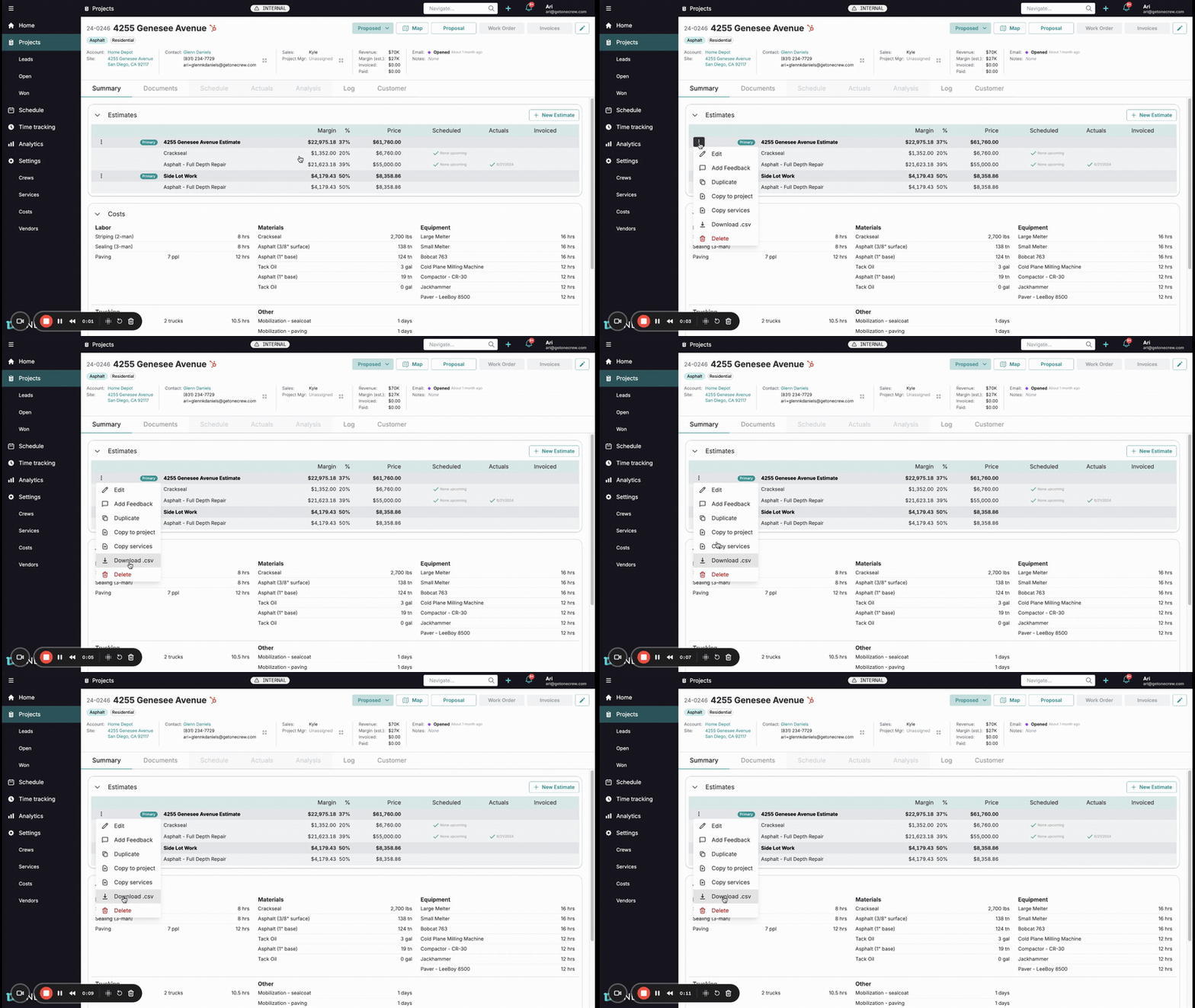
Follow these steps to download your estimate data:
Navigate to Your Estimate: Open the project containing the estimate you wish to export. Ensure you are on the Summary tab where the Estimates section is visible.
Locate the Estimate Options: Find the specific estimate line item in the list. To the left of the estimate name (e.g., "4255 Genesee Avenue Estimate"), you will see a three-dot menu icon (vertical ellipsis).
Open the Options Menu: Click on the three-dot menu icon. This will reveal a dropdown menu with several actions you can perform on that estimate.
Select Download CSV: From the dropdown menu, click on the Download .csv option.
Insight: Exporting to CSV provides a raw data format, giving you the flexibility to manipulate and analyze your estimate's cost breakdown using spreadsheet software like Microsoft Excel or Google Sheets.
File Download: Your browser will automatically download the CSV file containing all the cost details associated with that specific estimate. The file will typically be saved to your default downloads folder.
You now have a CSV file with a detailed breakdown of your estimate's costs!
Troubleshooting
"Download .csv" option is missing: Ensure you are clicking the three-dot menu directly associated with an individual estimate line item, not a general menu elsewhere on the page.
File not downloading: Check your browser's download settings and ensure pop-ups or downloads are not being blocked for the site. If issues persist, try a different browser or check your internet connection.