Hubspot Integration: A Guide
Last updated: August 7, 2025
Watch Video Demo Here
Overview
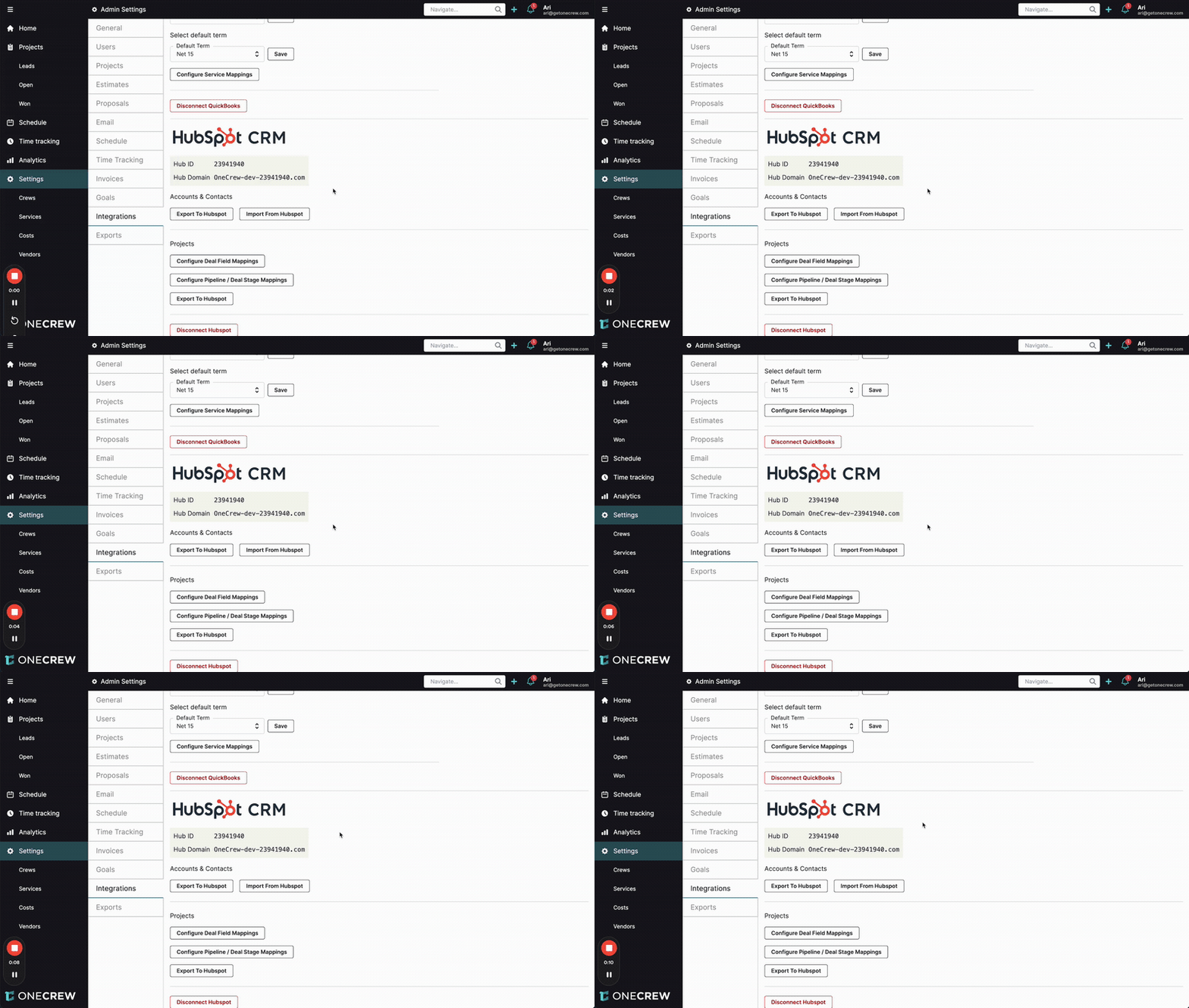
The OneCrew and HubSpot CRM integration is designed to create a seamless flow of information between your sales and operations teams. By connecting OneCrew, your project and operations management hub, with HubSpot, your customer relationship management (CRM) platform, you can ensure data consistency, eliminate redundant data entry, and empower your teams with up-to-date information.
Purpose and Scope: This integration facilitates a robust, two-way synchronization for key data points:
Accounts and Contacts: OneCrew Accounts sync with HubSpot Companies, and OneCrew Contacts sync with HubSpot Contacts.
Projects and Deals: OneCrew Projects sync with HubSpot Deals, including status updates and relevant field information.
Benefits:
Unified Customer View: Gain a 360-degree view of customer interactions, from initial lead in HubSpot to project execution in OneCrew.
Increased Efficiency: Automate data transfer between systems, reducing manual input and the risk of errors.
Improved Collaboration: Sales and operations teams can work from their preferred platforms while having access to consistent, real-time data.
Streamlined Workflows: Changes made in one system are automatically reflected in the other, keeping project statuses and customer details current.
Data-Driven Decisions: Leverage accurate, synchronized data for better reporting and decision-making across departments.
Insight: The core value of this integration lies in bridging the gap between sales and operations, ensuring that crucial customer and project data is always synchronized and accessible where it's needed most. This creates a single source of truth, empowering teams to work more efficiently and collaboratively.
Configuration
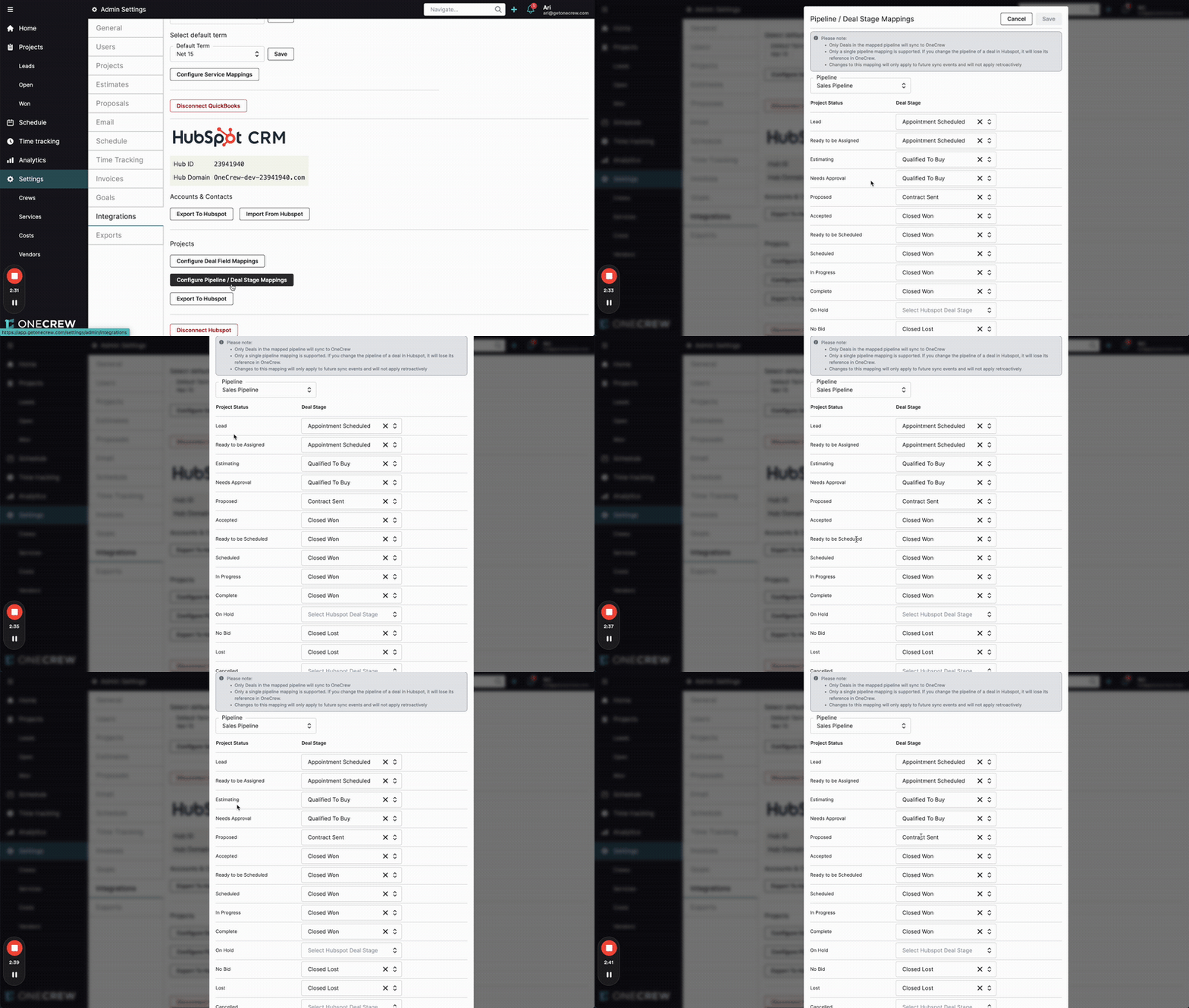
Configuring the OneCrew and HubSpot CRM integration involves setting up how Accounts, Contacts, Projects, and Deals synchronize between the two platforms. Once the initial connection is established, you can fine-tune these mappings.
Accounts & Contacts Synchronization
The synchronization of accounts and contacts is largely automatic once the integration is active:
OneCrew Accounts are bidirectionally synced with HubSpot Companies.
OneCrew Contacts are bidirectionally synced with HubSpot Contacts.
Any updates made to these records in either OneCrew or HubSpot will be reflected in the other system, typically within moments.
Projects & Deals Synchronization
To tailor the synchronization of project and deal information, navigate to Settings > Integrations in OneCrew, and find the HubSpot CRM section. Here, you'll find options for:
Configure Pipeline / Deal Stage Mappings:
This allows you to link OneCrew Project Statuses to specific HubSpot Deal Stages.
You must select a HubSpot Pipeline to which these mappings will apply.
Example: You can map the OneCrew Project Status "Proposed" to the HubSpot Deal Stage "Contract Sent" within your "Sales Pipeline."
Important Notes:
Only deals within the selected, mapped HubSpot pipeline will sync with OneCrew projects based on these stage mappings.
Only a single HubSpot pipeline mapping is supported at a time. If you change the pipeline of a deal in HubSpot, it may lose its reference in OneCrew.
Changes to these mappings will only apply to future synchronization events and will not retroactively update existing records.
Configure Deal Field Mappings:
This section enables you to map specific OneCrew Project Properties to corresponding HubSpot Deal Properties.
Available Mappings (Examples):
OneCrew Project Name to HubSpot Deal Name
OneCrew State (Project Status) to HubSpot Deal Stage
OneCrew Price to HubSpot Amount
OneCrew Contact to HubSpot Contact
OneCrew Account to HubSpot Company
OneCrew Salesperson to HubSpot Deal owner
OneCrew Project ID can be mapped to fields like Deal Description.
Important Notes:
HubSpot Deal Properties shown in the mapping dropdown are filtered based on field type compatibility.
Fields marked with an asterisk (
*) in the mapping interface (like Salesperson) will primarily sync from HubSpot to OneCrew.Most other standard fields will sync from OneCrew to HubSpot.
Syncing Deal Company and Contact associations from HubSpot (i.e., if you associate a company to a deal in HubSpot) is not currently supported for creating or updating these associations in OneCrew projects through this specific mechanism.
Changes to field mappings apply only to future sync events and are not retroactive.
Use Cases
The OneCrew and HubSpot CRM integration is invaluable in scenarios where sales activities in HubSpot need to translate seamlessly into operational projects in OneCrew, and vice-versa.
From Sales Lead to Operational Project:
When a sales representative in HubSpot moves a deal to a "Closed Won" stage (or a similarly configured stage), a corresponding project can be automatically initiated or updated in OneCrew, carrying over essential deal information. This ensures a smooth handover to the operations team.
Maintaining Consistent Customer Information:
A customer updates their contact information (e.g., phone number, email) with a sales representative. The representative updates the contact record in HubSpot. This change automatically syncs to the corresponding contact record in OneCrew, ensuring the operations team has the correct details.
Conversely, if an operations team member updates a contact's details directly in OneCrew, these changes will reflect back in HubSpot, keeping the sales team informed.
Tracking Project Progress Across Platforms:
The operations team updates the status of a project in OneCrew (e.g., from "Proposed" to "In Progress"). This status change, based on your configured mappings, updates the corresponding Deal Stage in HubSpot. This gives the sales team visibility into project progress without needing to leave HubSpot.
Centralized Deal and Project Financials:
Key financial data, such as the deal amount from HubSpot, can be mapped to the project price in OneCrew. As the project progresses and actual costs are tracked in OneCrew, this information can provide a clearer picture of profitability when viewed alongside the initial deal value.
Pro Tip: Before implementing, map out your sales and operational workflows. Identify which HubSpot Deal Stages should correspond to which OneCrew Project Statuses to ensure the synchronization aligns perfectly with your business processes. For more details on initial setup, please refer to our integration setup guide [add link to relevant article on integration setup].
Examples
Let's explore how the OneCrew and HubSpot CRM integration works in real-world scenarios.
Example 1: Seamless Contact Information Updates (Two-Way Sync)
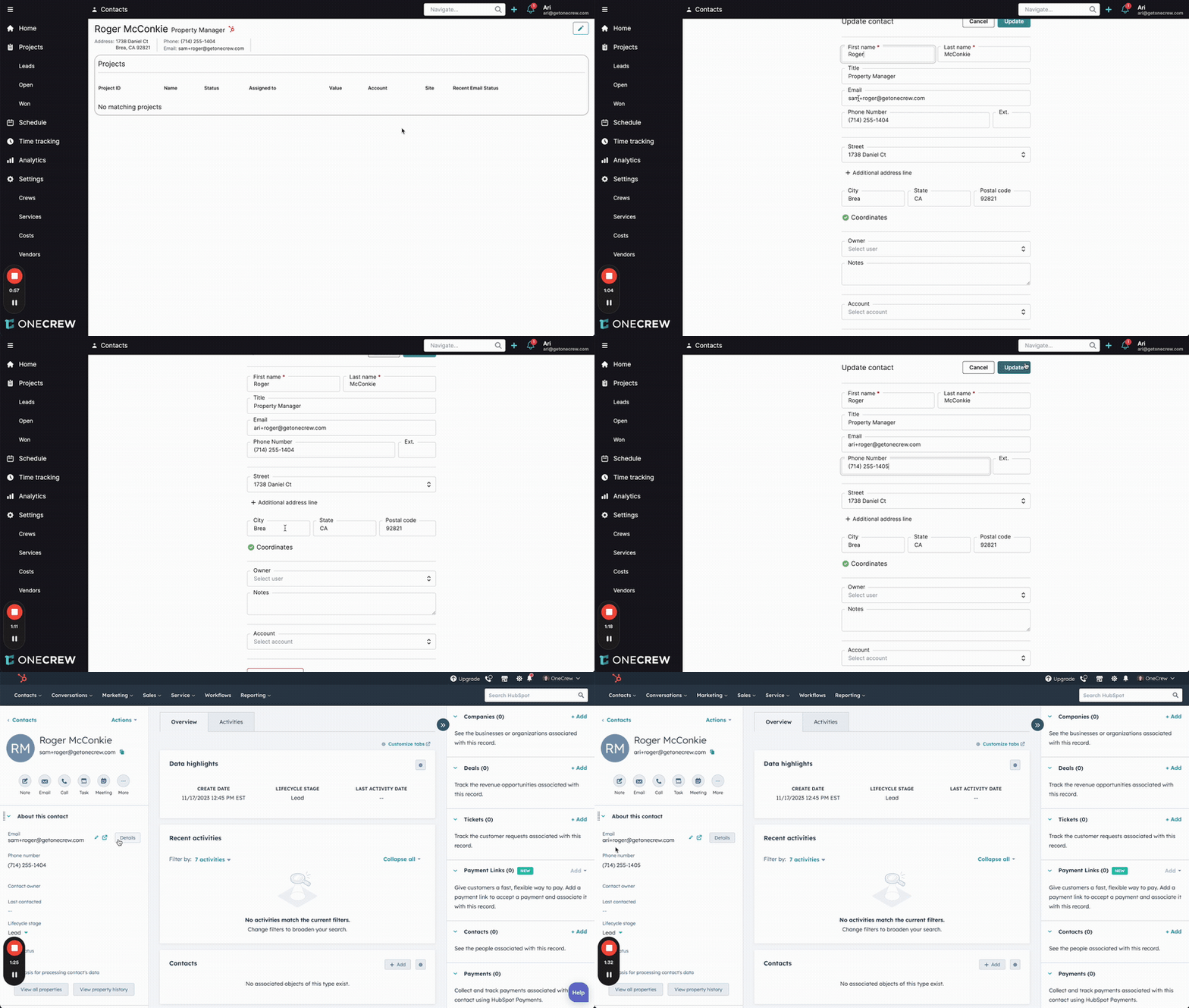
Imagine a customer, Roger McConkie, informs your operations team about a new email address and phone number during a project update call.
Update in OneCrew:
An operations team member navigates to Roger McConkie's contact record in OneCrew.
They update the Email field from
sam+roger@getonecrew.comtoari+roger@getonecrew.com.They update the Phone Number field from
(714) 255-1404to(714) 255-1405.They click Update in OneCrew.
Automatic Update in HubSpot:
Almost instantly, if a sales team member views Roger McConkie's contact record in HubSpot, they will see the new email address (
ari+roger@getonecrew.com) and phone number ((714) 255-1405) reflected.
Conversely, if the sales team updated Roger's details in HubSpot first (e.g., changing the email to ari+roger2@getonecrew.com and phone back to (714) 255-1404), these changes would automatically sync back to Roger's contact record in OneCrew. This ensures both teams are always working with the most current customer information.
Example 2: Synchronizing Project Progression and Details to HubSpot Deals
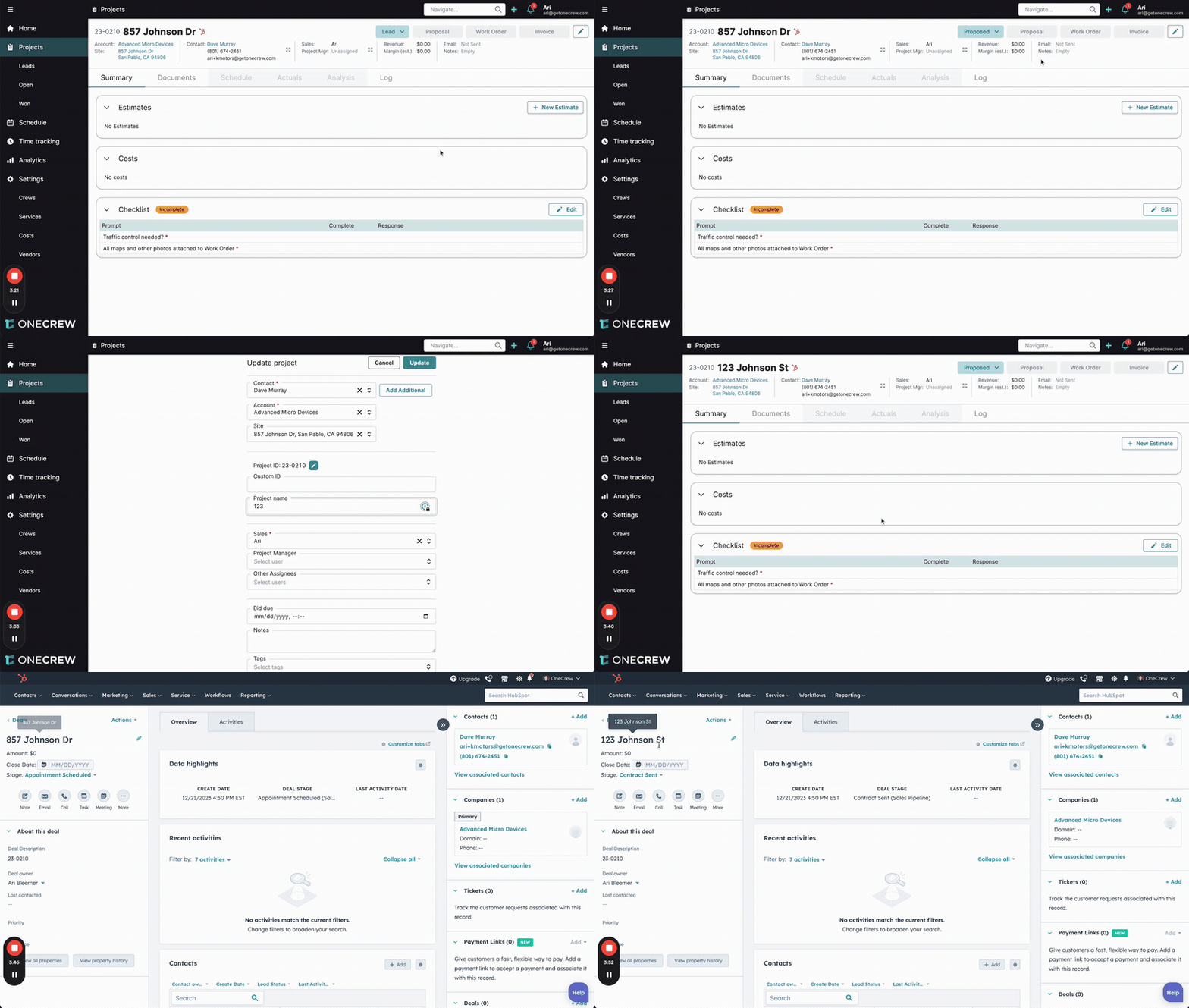
Consider a project in OneCrew, "857 Johnson Dr," which is currently in the "Lead" status. Your pipeline mapping dictates that the OneCrew "Lead" status corresponds to the HubSpot "Appointment Scheduled" deal stage, and the OneCrew "Proposed" status corresponds to the HubSpot "Contract Sent" deal stage.
Update Project in OneCrew:
The project manager in OneCrew updates the project for "857 Johnson Dr" (Project ID: 23-0210).
They change the Project Status from "Lead" to "Proposed".
They also refine the Project Name to "123 Johnson St" for better clarity.
They save these changes in OneCrew.
Automatic Update in HubSpot Deal:
When anyone views the corresponding deal (originally named "857 Johnson Dr") in HubSpot:
The Deal Name will be updated to "123 Johnson St".
The Deal Stage will automatically change from "Appointment Scheduled" to "Contract Sent", reflecting the mapping from the OneCrew "Proposed" status.
This keeps your sales team instantly informed of significant project milestones and detail changes directly within their CRM environment, fostering better communication and a more cohesive customer experience.