Using Cost Selection for Estimates
Last updated: August 7, 2025
Overview
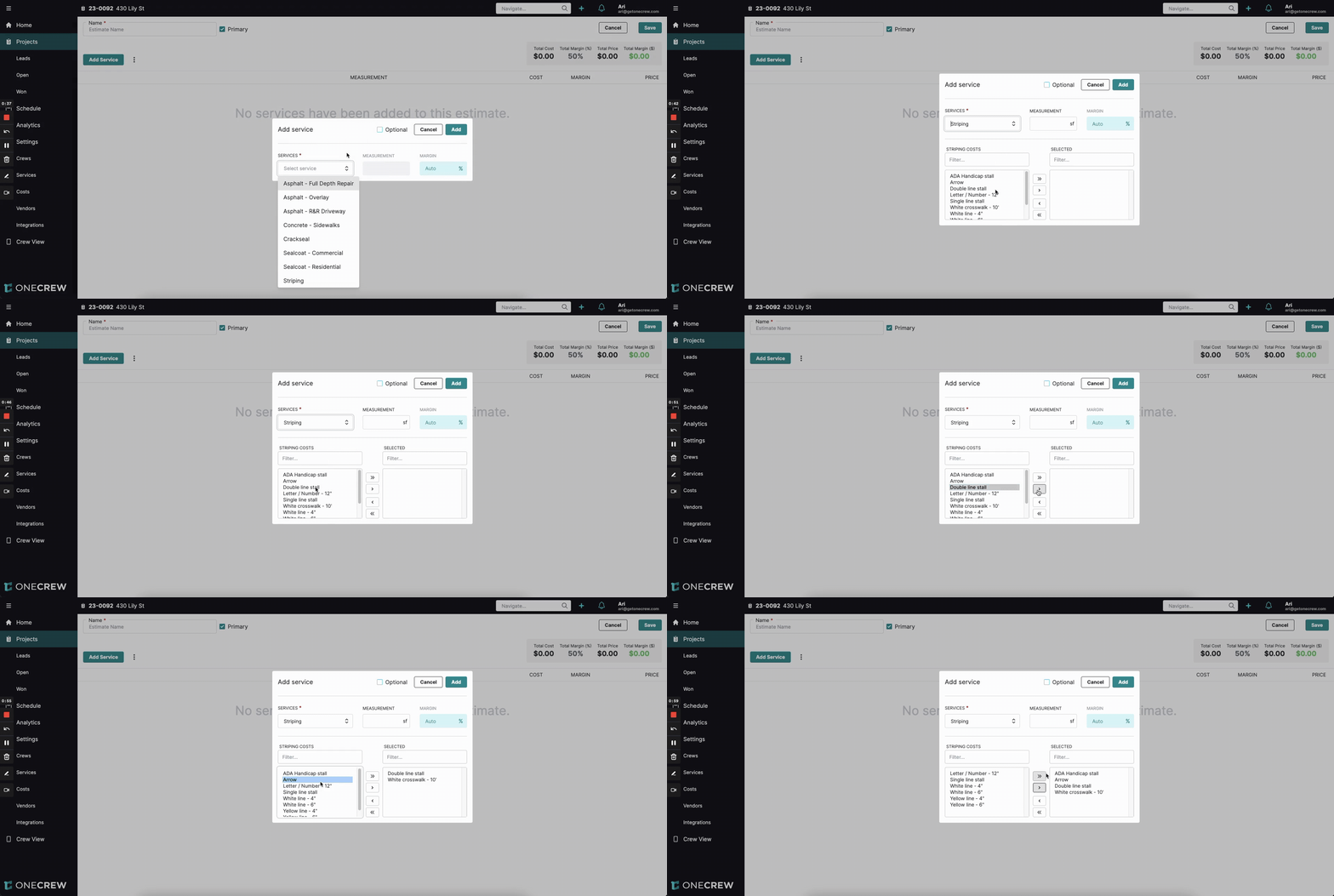
The Multi-Cost Selection feature provides enhanced flexibility and precision when building estimates for services that have multiple optional components. Instead of adding all predefined costs associated with a service category, this feature allows you to choose specific costs from a category to include in your estimate. This ensures that estimates are tailored accurately to the job requirements, improving clarity and cost control.
The primary purpose of Multi-Cost Selection is to streamline the estimation process for complex services where not all potential costs are applicable to every job. By enabling this feature for specific cost categories within a service, you can present a list of available costs to the estimator, who can then pick and choose only the relevant items.
Benefits:
Increased Accuracy: Estimates reflect only the necessary costs, leading to more precise project pricing.
Enhanced Flexibility: Easily customize services on a per-estimate basis without altering the master service definition.
Improved Efficiency: Quickly add multiple specific items from a predefined list, saving time compared to adding each cost individually.
Better Clarity: Provides a clear breakdown of selected optional costs within the estimate.
Configuration
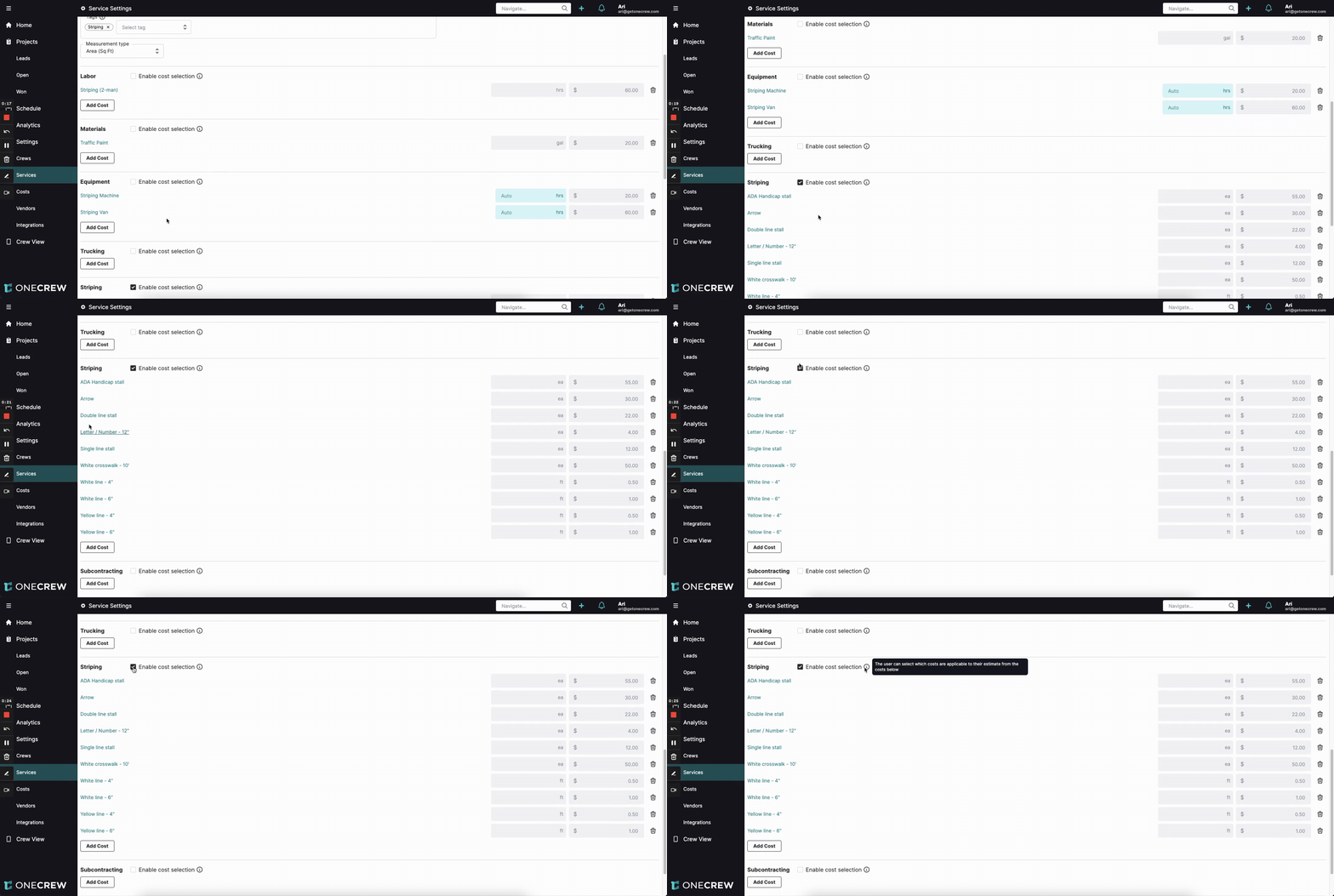
Configuring Multi-Cost Selection is done at the service level, allowing you to specify which cost categories within a service should offer this selective functionality.
To enable Multi-Cost Selection for a service:
Navigate to Service Settings. This is typically found in your main application settings or configuration area.
From the list of services, select the service you wish to configure (e.g., "Striping"). This will open the detailed settings page for that service.
On the service settings page, you will see various cost categories defined for the service, such as Labor, Materials, Equipment, and any custom categories you've created (e.g., "Striping" as a category for specific striping items).
For each cost category where you want to enable selective costing, locate the Enable cost selection checkbox.
For example, under the "Striping" cost category, which might contain items like "ADA Handicap stall," "Arrow," "Double line stall," etc., check the Enable cost selection box.
You can choose to leave this unchecked for other categories like Labor or Materials if those costs are always standard for the service.
Once checked, any costs predefined within that category (e.g., "ADA Handicap stall," "Arrow") will become selectable options when this service is added to an estimate.
Save your changes to the service.
Use Cases
Multi-Cost Selection is particularly valuable in scenarios where a service encompasses a variety of optional components or tasks that might not be required for every project.
Consider these situations:
Services with Many Optional Add-ons: For a service like "Landscaping," you might have a "Planting" cost category with numerous types of plants, shrubs, and trees. Instead of adding all possible plants to every landscaping estimate, Multi-Cost Selection allows the estimator to choose only the specific plants quoted for that particular job.
Variable Itemization: In fields like pavement striping, a single "Striping" service can involve various elements such as different types of lines (single, double, white, yellow), symbols (arrows, handicap stalls), and lettering/numbering. Multi-Cost Selection enables you to pick only the specific striping elements needed for a parking lot or roadway.
Customizable Service Packages: If you offer tiered service packages (e.g., Basic, Standard, Premium cleaning services), where each tier includes a different set of tasks under a general "Cleaning Tasks" category, this feature allows you to easily select the tasks corresponding to the chosen package.
Modular Repair Services: For an "Appliance Repair" service, the "Parts" cost category could list common replacement parts. An estimator can select only the parts needed for a specific repair, rather than including a generic parts allowance or all possible parts.
Essentially, if a cost category within your service acts more like an "à la carte" menu rather than a fixed set of items, Multi-Cost Selection is the ideal solution.
Insight: Granular Control for Precise Estimates Enabling Multi-Cost Selection on a per-category basis gives you fine-tuned control. This means for a single service, some cost categories can have fixed costs that are always included, while others offer a pick-list, ensuring maximum accuracy and relevance in your estimates.
You do not need to configure anything on the estimate itself; the behavior is driven by the service's configuration.