Change Orders: A Guide
Last updated: August 7, 2025
Watch Video Demo Here
Overview
This guide provides a comprehensive overview of managing Deductive Change Orders and incorporating Optional Services within change orders in your projects. These features offer enhanced flexibility in adjusting project scope, ensuring accurate financial tracking, and providing clients with choices.
A Deductive Change Order is used when the scope of a project is reduced, leading to a decrease in the project's cost and price. This could be due to a client's request, an overestimation in the original scope, or an inability to perform certain work.
Optional Services in Change Orders allow you to propose additional or alternative services to the client without immediately including them in the change order's total. The client can then choose to accept these optional items, which will then be added to the project's scope and financials.
Benefits:
Accurate Financials: Precisely reflect reductions or additions to project scope, ensuring correct tracking of costs, revenue, and margins.
Client Transparency: Clearly communicate all changes, including deductions and options, fostering trust and managing expectations.
Flexibility: Adapt to evolving project requirements and client needs efficiently.
Upselling & Alternatives: Offer clients valuable add-ons or alternative solutions directly within the change order process.
Improved Decision Making: Present clear choices to clients, empowering them to make informed decisions about their project.
Configuration
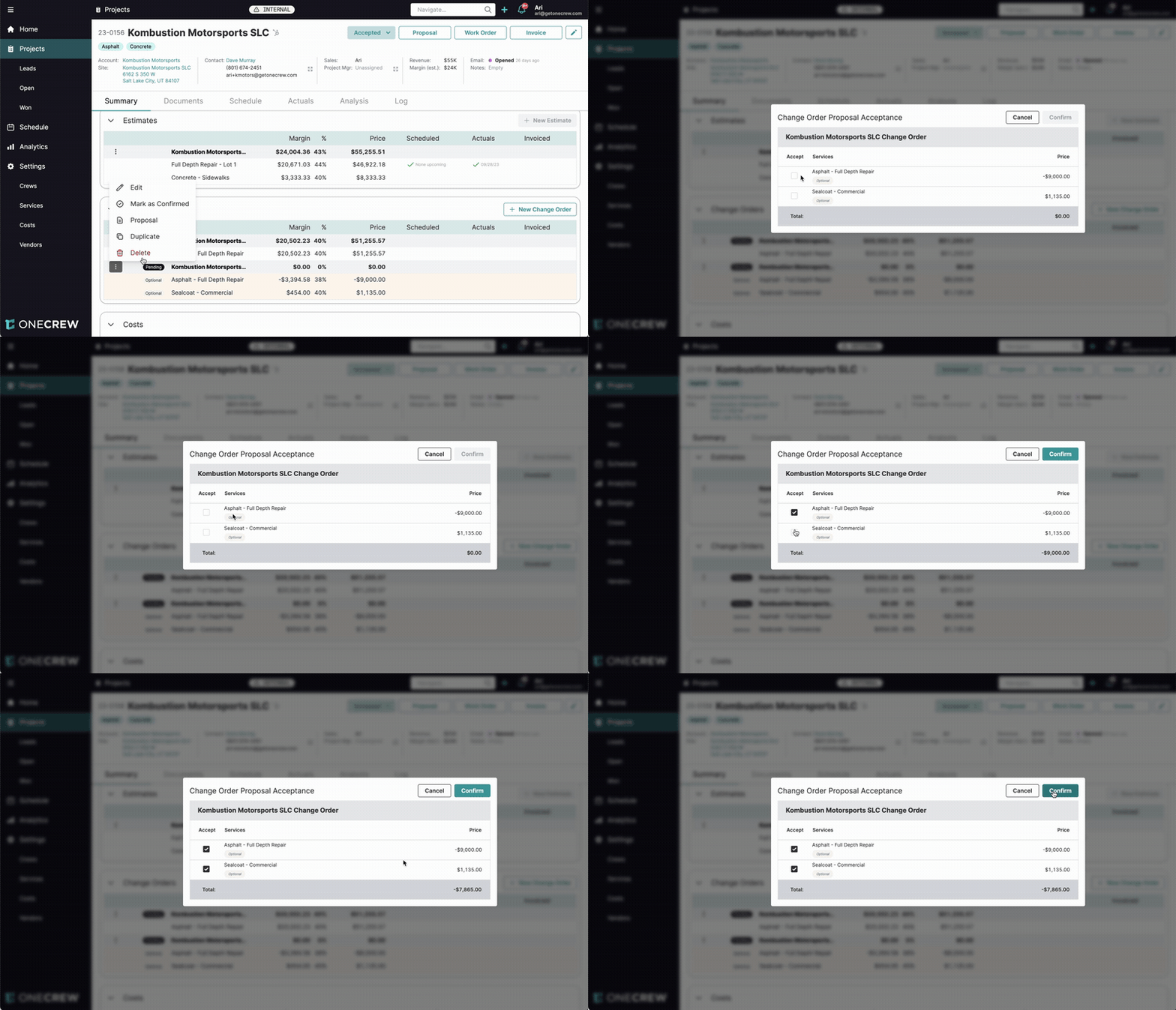
Properly configuring deductive amounts and optional services is key to their effectiveness. These settings are managed when creating or editing a change order within an accepted project.
Deductive Change Orders
To create a change order that deducts from the project's scope and value:
Navigate to the relevant project and initiate a New Change Order or edit an existing one.
Click Add Service and select the service whose scope is being reduced.
In the Measurement field for that service, enter a negative value representing the quantity being removed (e.g., -1000 for 1000 square feet).
The system will automatically calculate negative Total Cost and a negative Total Price (pre-tax) based on the service's predefined rates and the negative measurement.
You can adjust the Margin % for this deductive item. For instance, you might pass on the full cost saving (0% margin on the deduction) or maintain your standard margin on the credited amount. You can also directly override the calculated Total Price (pre-tax) if a specific credit amount is required.
Expand the service to view its detailed cost breakdown (Labor, Materials, Equipment, Trucking, Other). Enter negative values in the Units fields for these line items to reflect the reduction in resources (e.g., -4 hours, -10 gallons, -2 trucks).
Important Note on Negative Units: For cost items with multiple quantity inputs (e.g., Trucking, which might have fields for 'Trucks' and 'Hours'), ensure only one of these fields is made negative if you are deducting. For example, if reducing trucking by 4 hours using 2 trucks, input 2 for Trucks and -4 for Units (hrs). Entering negative values in both fields (e.g., -2 trucks and -4 hours) may result in an unintended positive calculation.
Optional Services in Change Orders
To include services that the client can choose to accept:
When adding a service via the Add Service button in a change order:
Select the service and enter its measurement and margin as usual.
Check the Optional checkbox before clicking Add.
Alternatively, for a service already added to the change order:
Click the three-dot menu (more options) next to the service line item.
Select Mark optional from the dropdown menu.
Services marked as optional will be clearly indicated in the change order details. Initially, their price will not be included in the change order's main financial totals.
Confirming and Accepting Optional Services:
The decision to include optional services is made during the change order confirmation process:
When you mark the change order as Confirmed internally, or when a client views and accepts a digital change order proposal:
A Change Order Proposal Acceptance modal will appear.
This modal lists all services in the change order, with checkboxes next to each optional service under an "Accept" column.
Select the optional services the client wishes to proceed with by checking the corresponding Accept box.
Click Confirm.
The change order's totals (and subsequently the project's overall financials) will update to include the costs and prices of the accepted optional services. Non-accepted optional services will remain on the change order for record-keeping but will not impact the financials.
Insight: Optional services empower clients by providing choices directly within the change order. This transparency can turn a simple scope adjustment into a collaborative process, potentially leading to higher client satisfaction and opportunities to add more value to the project.
Examples
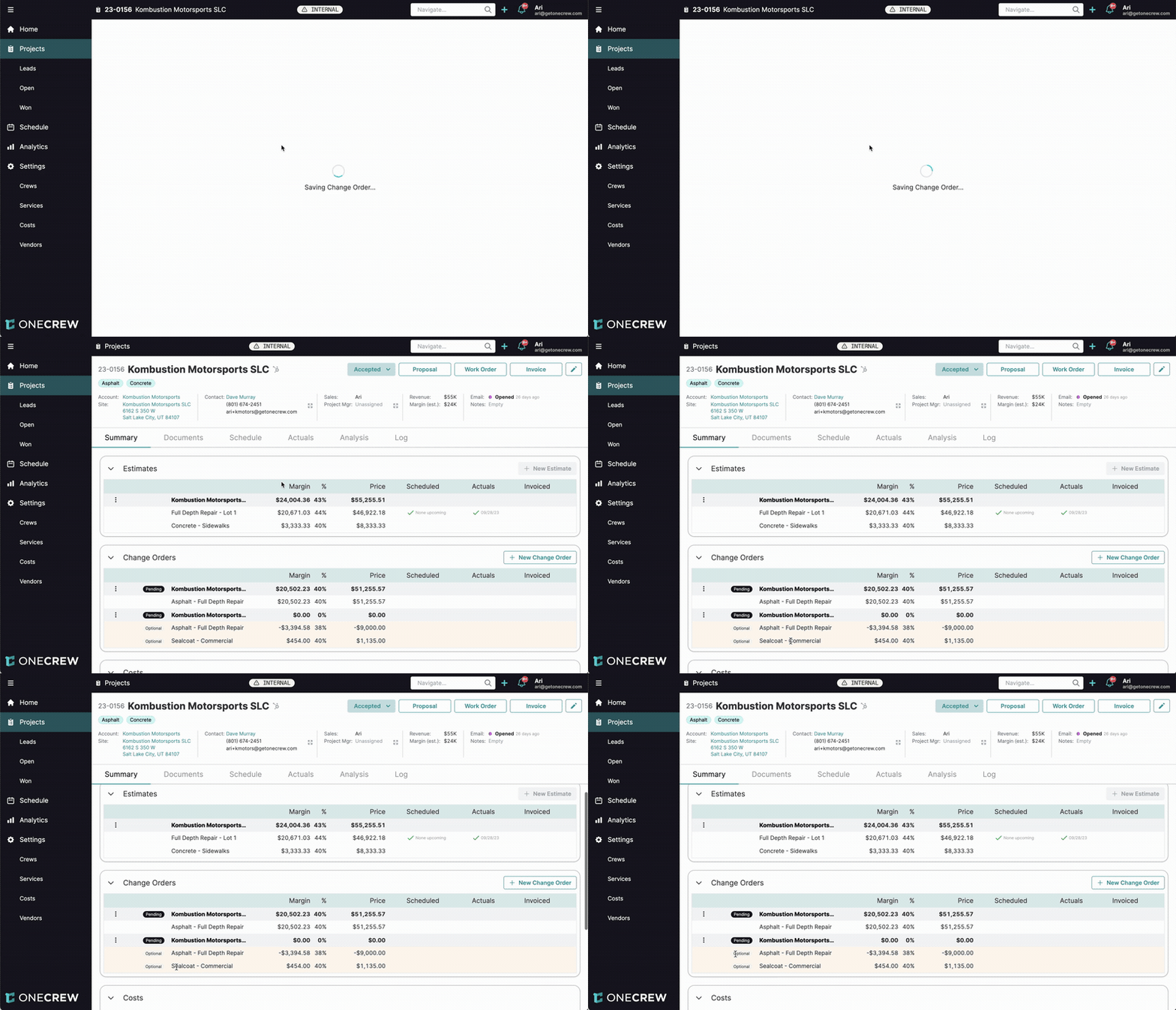
Real-world scenarios illustrate how these features add value and precision to project management.
Example 1: Reducing Paving Scope (Deductive)
A client initially contracted for 5,000 sq ft of asphalt resurfacing. Due to budget adjustments, they now want to reduce this to 4,000 sq ft.
Create a New Change Order for the project.
Name it appropriately, e.g., "Reduction in Asphalt Resurfacing Area."
Click Add Service and select "Asphalt - Overlay."
In the Measurement field, enter -1000 sf (the amount being reduced).
The system calculates a negative price for this reduction. Ensure the Margin % reflects how you want to credit this back (e.g., 40% if maintaining margin on the credit, or adjust as needed).
Expand the service and adjust the Units for labor, materials (e.g., asphalt tonnage), and equipment to negative values corresponding to the 1,000 sq ft reduction.
Save the change order.
Upon confirmation, this change order will decrease the project's total revenue and cost by the specified amounts.
Example 2: Removing Work and Offering Optional Sealcoating (Deductive & Optional)
A project originally included a 200 sq ft concrete sidewalk repair. The client decides not to proceed with this specific repair. However, they are interested in potentially adding sealcoating to their existing 1,500 sq ft asphalt driveway if the overall cost change is favorable.
Create a New Change Order.
Deductive Part (Sidewalk Repair Removal):
Click Add Service and select "Concrete - Sidewalks."
Enter -200 sf in the Measurement field.
Adjust underlying labor, material, and equipment units to negative values.
Optional Part (Driveway Sealcoating):
Click Add Service again and select "Sealcoat - Commercial."
Enter 1500 sf in the Measurement field.
Set the desired Margin % for the sealcoating.
Crucially, check the Optional box before adding this service (or mark it as optional via the three-dot menu after adding).
Save the change order.
When this change order is presented to the client (e.g., via a digital proposal) or marked as Confirmed internally:
The Change Order Proposal Acceptance modal will appear.
The "Concrete - Sidewalks" removal (negative value) will be part of the base change.
"Sealcoat - Commercial" will be listed with an Accept checkbox.
If the client chooses to accept the sealcoating, they (or you) check the box.
Click Confirm. The final change order value will be the sum of the negative credit for the sidewalk removal and the positive cost of the (accepted) sealcoating. The project's overall revenue and margin will adjust accordingly.
Pro Tip: When presenting change orders with both deductive and optional items, clearly explain each component to the client. This ensures they understand the credits they are receiving and the costs associated with any new choices, leading to smoother approvals. Learn more about sending digital proposals [add link to relevant article on digital proposals].
Use Cases
Understanding when to use deductive change orders and optional services can significantly streamline project management and client communication.
Deductive Change Orders
Utilize deductive change orders in scenarios such as:
Client-Requested Scope Reduction: The client decides to scale back a portion of the project, requiring less work or fewer materials than originally planned.
Correction of Original Estimate: An item or service included in the initial estimate is later found to be unnecessary, over-specified, or can be achieved more efficiently.
Unforeseen Site Conditions: On-site discoveries prevent a portion of the planned work from being executed as scoped.
Material or Service Unavailability: A specified material or service becomes unavailable, and the alternative, or removal, results in a cost saving.
Optional Services in Change Orders
Incorporate optional services when:
Proposing Upgrades or Enhancements: Offer an upgraded material, a premium finish, or an additional service related to the work being changed. For example, if a standard item is being replaced, you could offer a premium version as an option.
Providing Alternatives: Present clients with choices between different solutions, materials, or methods for a particular aspect of the project modification.
Phasing Work: Introduce potential future work or enhancements that the client can choose to proceed with at a later stage or as part of the current change.
Value-Added Services: Suggest complementary services that could enhance the project's outcome, giving the client the choice to include them.
Addressing Client Indecision: When a client is unsure about an addition or change, presenting it as optional allows them to see the cost implications before committing.